

搜索到
381
篇与
moonjerx
的结果
-

-
ubuntu安装、使用docker方法 一、安装1、查看内核uname -r2、更新包sudo apt-get update3、没有docker旧版本,忽略这一步。如果有则需要卸载旧的版本,主要为了防止新旧版本冲突sudo apt-get remove docker docker-engine docker.io containerd runc4、为了防止 apt 源使用 HTTPS 以确保软件下载过程中不被篡改。我们需要添加使用 HTTPS 传输的软件包及 CA 证书sudo apt-get install apt-transport-https ca-certificates curl gnupg lsb-release5、确认下载软件包的合法性,需要添加软件源的 GPG 密钥,但因网络问题设置docker源改为国内源(阿里)curl -fsSL https://mirrors.aliyun.com/docker-ce/linux/ubuntu/gpg | sudo gpg --dearmor -o /usr/share/keyrings/docker-archive-keyring.gpg或curl -fsSL http://mirrors.aliyun.com/docker-ce/linux/ubuntu/gpg | sudo apt-key add -6、向 source.list 中添加 Docker CE 软件源sudo add-apt-repository "deb [arch=amd64] http://mirrors.aliyun.com/docker-ce/linux/ubuntu $(lsb_release -cs) stable"或使用https://mirrors.ustc.edu.cn源(失效)sudo add-apt-repository "deb [arch=armhf] https://mirrors.ustc.edu.cn/docker-ce/linux/raspbian $(lsb_release -cs) stable"7、安装sudo apt-get -y install docker.io或sudo apt-get install docker-ce docker-ce-cli containerd.io启动dockersudo systemctl start dockerdocker换源修改 /etc/docker/daemon.json (如果该文件不存在,则创建){ "registry-mirrors": [ "https://hub-mirror.c.163.com" ] }sudo systemctl daemon-reload && sudo systemctl restart docker添加用户到docker用户组
-
shell命令:判断文件或目录是否存在 一、文件比较符-e filename 如果 filename 存在,则为真-d filename 如果 filename 为目录,则为真-f filename 如果 filename 为常规文件,则为真-L filename 如果 filename 为符号链接,则为真-r filename 如果 filename 可读,则为真-w filename 如果 filename 可写,则为真-x filename 如果 filename 可执行,则为真 -s filename 如果 文件长度不为0,则为真 -h filename 如果 文件是软链接,则为真-O filename 如果 filename 存在,并且属于当前用户,则为真-G filename 如果 filename 存在,并且属于当前用户组,则为真-nt 判断file1是否比file2新 ["/data/file1" -nt"/data/file2" ]-ot 判断file1是否比file2旧 ["/data/file1" -ot"/data/file2" ]二、常用例子1,文件夹不存在则创建if [ ! -d "/data/" ]; then mkdir /data else echo "文件夹已经存在" fi2,文件存在则删除if [ ! -f "/data/filename" ]; then echo "文件不存在" else rm -f /data/filename fi3,判断文件是否存在,不存在则创建if [ ! -f "$file" ]; then touch "$file" fi4,文件夹是否存在if [ -d "/data/" ]; then echo "文件夹存在" else echo "文件夹不存在" fi
-
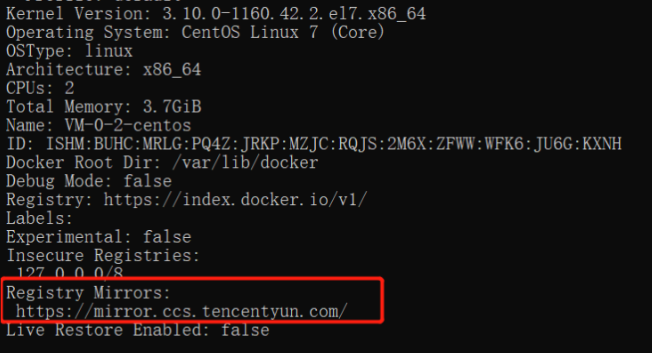
docker更换国内镜像源 通过配置文件启动Docker,修改 /etc/docker/daemon.json 文件并添加上 registry-mirrors 键值。sudo vim /etc/docker/daemon.json{ "registry-mirrors" : [ "https://registry.docker-cn.com", "http://hub-mirror.c.163.com", "https://docker.mirrors.ustc.edu.cn", "https://cr.console.aliyun.com", "https://mirror.ccs.tencentyun.com" ] }sudo service docker restart sudo systemctl daemon-reload #重载配置 sudo systemctl restart docker #重启docker查看配置是否成功:docker infoRegistry Mirrors:有截图中框起来的就说明配置成功。Docker中国区官方镜像:https://registry.docker-cn.com网易:http://hub-mirror.c.163.comustc:https://docker.mirrors.ustc.edu.cn中国科技大学:https://docker.mirrors.ustc.edu.cn阿里云:https://cr.console.aliyun.com/阿里云:https://<你的ID>.mirror.aliyuncs.com(打开此地址登录你的阿里云账号获取你的专属镜像源https://cr.console.aliyun.com/#/accelerator)腾讯云:https://mirror.ccs.tencentyun.com科大镜像:https://docker.mirrors.ustc.edu.cn/七牛云加速器:https://reg-mirror.qiniu.com
-
docker运行svn 一、安装命令docker run -d \ --restart=unless-stopped \ --name svn \ -v /home/path:/var/opt/svn \ -p 3690:3690 \ garethflowers/svn-server二、开放端口查看端口是否开启firewall-cmd --list-all开启端口firewall-cmd --add-port=3690/tcp --permanent重启防火墙firewall-cmd --reload三、初始化仓库docker exec -it svn /bin/shcd /var/opt/svn && svnadmin create repos && cd repos打开 conf 配置文件资源仓库配置,修改 svnserve.confanon-access = none # 匿名用户不可读写,也可设置为只读 read auth-access = write # 授权用户可写 password-db = passwd # 密码文件路径,相对于当前目录 authz-db = authz # 访问控制文件 realm = /var/opt/svn/repos # 认证命名空间,会在认证提示界面显示,并作为凭证缓存的关键字,可以写仓库名称比如svn### users have read-only access to the repository, while authenticated ### users have read and write access to the repository. # anon-access = read # auth-access = write anon-access = none auth-access = write ### The password-db option controls the location of the password ### database file. Unless you specify a path starting with a /, ### the file's location is relative to the directory containing ### this configuration file. ### If SASL is enabled (see below), this file will NOT be used. ### Uncomment the line below to use the default password file. password-db = passwd ### The authz-db option controls the location of the authorization ### rules for path-based access control. Unless you specify a path ### starting with a /, the file's location is relative to the ### directory containing this file. The specified path may be a ### repository relative URL (^/) or an absolute file:// URL to a text ### file in a Subversion repository. If you don't specify an authz-db, ### no path-based access control is done. ### Uncomment the line below to use the default authorization file. authz-db = authz ### The groups-db option controls the location of the file with the ### group definitions and allows maintaining groups separately from the ### authorization rules. The groups-db file is of the same format as the ### authz-db file and should contain a single [groups] section with the ### group definitions. If the option is enabled, the authz-db file cannot ### contain a [groups] section. Unless you specify a path starting with ### a /, the file's location is relative to the directory containing this ### file. The specified path may be a repository relative URL (^/) or an ### absolute file:// URL to a text file in a Subversion repository. ### This option is not being used by default. # groups-db = groups ### This option specifies the authentication realm of the repository. ### If two repositories have the same authentication realm, they should ### have the same password database, and vice versa. The default realm ### is repository's uuid. # realm = My First Repository realm = /var/opt/svn/repos ### The force-username-case option causes svnserve to case-normalize ### usernames before comparing them against the authorization rules in the ### authz-db file configured above. Valid values are "upper" (to upper- ### case the usernames), "lower" (to lowercase the usernames), and ### "none" (to compare usernames as-is without case conversion, which ### is the default behavior). # force-username-case = none ### The hooks-env options specifies a path to the hook script environment ### configuration file. This option overrides the per-repository default ### and can be used to configure the hook script environment for multiple ### repositories in a single file, if an absolute path is specified. ### Unless you specify an absolute path, the file's location is relative ### to the directory containing this file. # hooks-env = hooks-env [sasl] ### This option specifies whether you want to use the Cyrus SASL ### library for authentication. Default is false. ### Enabling this option requires svnserve to have been built with Cyrus ### SASL support; to check, run 'svnserve --version' and look for a line ### reading 'Cyrus SASL authentication is available.' # use-sasl = true ### These options specify the desired strength of the security layer ### that you want SASL to provide. 0 means no encryption, 1 means ### integrity-checking only, values larger than 1 are correlated ### to the effective key length for encryption (e.g. 128 means 128-bit ### encryption). The values below are the defaults. # min-encryption = 0 # max-encryption = 256四、创建用户修改 passwd 文件,创建用户### This file is an example password file for svnserve. ### Its format is similar to that of svnserve.conf. As shown in the ### example below it contains one section labelled [users]. ### The name and password for each user follow, one account per line. [users] # harry = harryssecret # sally = sallyssecret admin = 123456 zhangsan = 123456 lisi = 123456五、分配权限修改 authz 文件,创建用户### This file is an example authorization file for svnserve. ### Its format is identical to that of mod_authz_svn authorization ### files. ### As shown below each section defines authorizations for the path and ### (optional) repository specified by the section name. ### The authorizations follow. An authorization line can refer to: ### - a single user, ### - a group of users defined in a special [groups] section, ### - an alias defined in a special [aliases] section, ### - all authenticated users, using the '$authenticated' token, ### - only anonymous users, using the '$anonymous' token, ### - anyone, using the '*' wildcard. ### ### A match can be inverted by prefixing the rule with '~'. Rules can ### grant read ('r') access, read-write ('rw') access, or no access ### (''). [aliases] # joe = /C=XZ/ST=Dessert/L=Snake City/O=Snake Oil, Ltd./OU=Research Institute/CN=Joe Average [groups] # harry_and_sally = harry,sally # harry_sally_and_joe = harry,sally,&joe administrator = admin test = zhangsan dev = lisi # [/foo/bar] # harry = rw # &joe = r # * = # [repository:/baz/fuz] # @harry_and_sally = rw # * = r [/] @administrator = rw @test = r @dev = rw 六、导出和导入全部数据svnadmin dump /var/opt/svn/repos/ > /var/opt/svn/backup/fullsvn.baksvnadmin load /var/opt/svn/repos/ < /var/opt/svn/backup/fullsvn.bak



您的IP: